Automate email and document work with human review.
RuzinCompany Oy helps business teams in Finland and across Europe reduce repeated email entry, document checks and searching. We work in English. Start by finding a useful task, or validate one you already have in mind before a scoped build.
Explore email and request handling, document processing and internal knowledge search. We assess the fit with your existing tools before proposing an integration.
The self-service workflow check is free. Consulting and implementation are scoped separately.
requestrulesexceptionsapprovalsystem update
Recognise the work
Which business tasks could you automate with AI?
Start where your team spends time moving information between tools, checking documents or answering recurring questions. A useful candidate has a clear owner, representative examples and a result you can check.
Reads and classifiesincoming requests or messages
Extracts informationfrom emails, forms, PDFs or documents
Checks informationagainst business rules and required fields
Copies resultsbetween different tools or systems
Searches internal materialbefore preparing a response
Waits for approvalbefore routine decisions can move forward
Handles repeated exceptionsusing the same manual checks each time
Relies on memorybecause important steps live in people's heads
The shape changes. The control problem repeats.
Intake and triageDocument and data processingKnowledge retrieval and responseApproval and system updatesReporting and researchFollow-up and coordination
The control path
Automation is the whole route, not one clever answer.
Rules, interpretation, validation and human judgment each do a different job. The design decides where work can move automatically and where it must stop.
Receive
Accept a request, file or system event.
Extract
Turn unstructured input into usable fields.
Validate
Check required information and confidence.
Apply rules
Use explicit routing and business rules.
Escalate
Separate missing, uncertain or unusual cases.
Human approval
Keep judgment at the right control point.
control point
Update systems
Prepare or perform an agreed external action.
Log and monitor
Record outcomes, retries and failures.
Important actions wait for an explicit decision.
Approval, permissions and recovery are part of the workflow design, not a note added later.
Human approval where judgment matters
Validation before system updates
Duplicate and missing-data checks
Permissions and access boundaries
Audit logs and traceable actions
Retry and failure recovery
Measurable acceptance criteria
Customer-specific testing before production
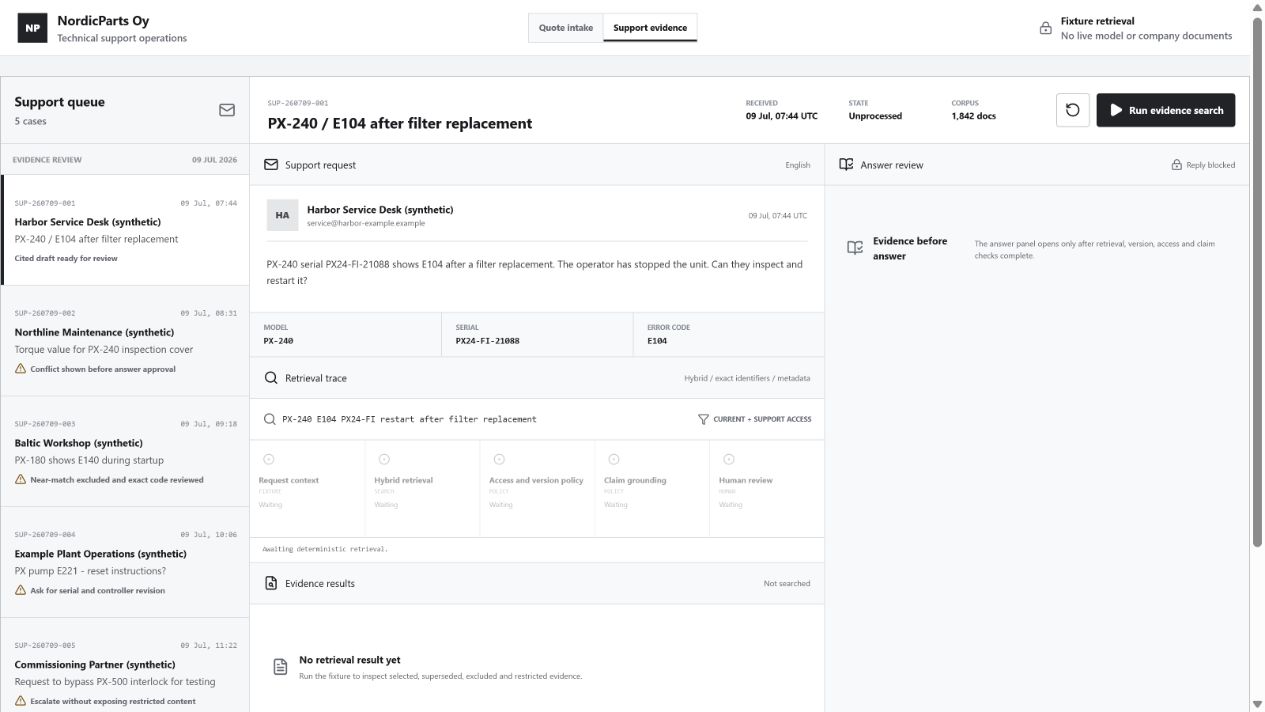
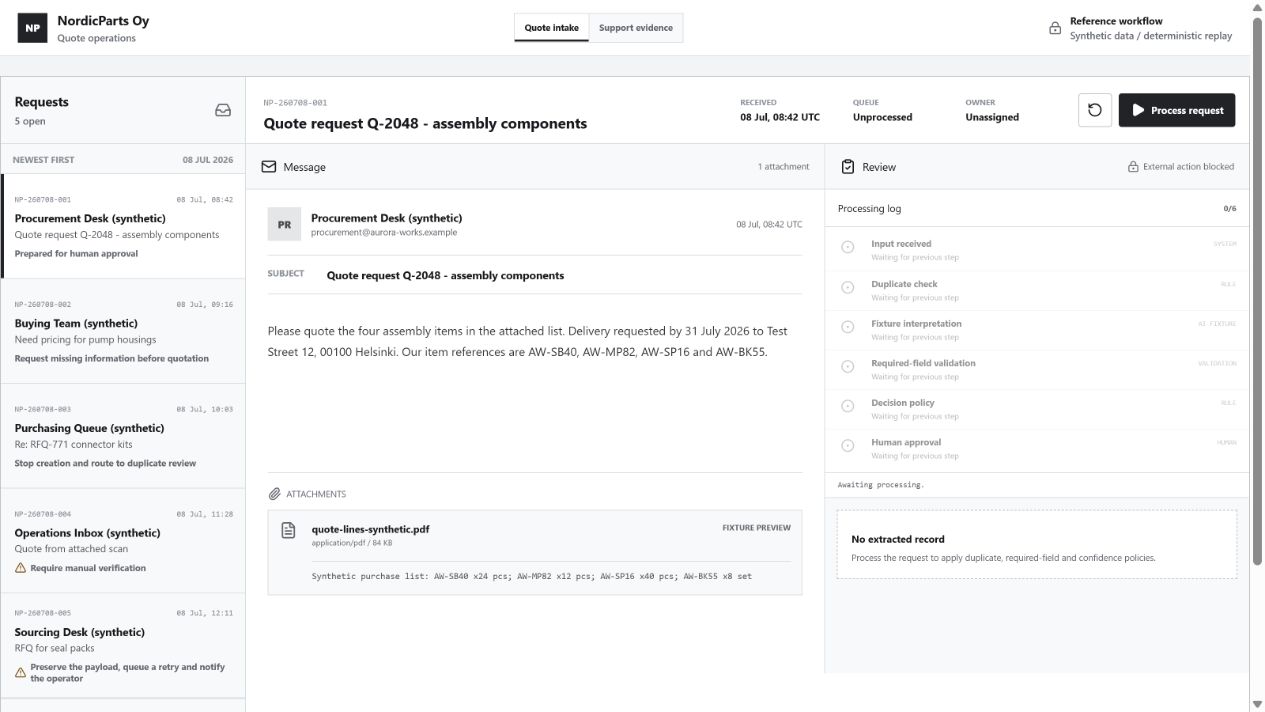
Interactive evidence
Look inside two working reference workflows.
Both demos use deterministic fictional fixtures. Try normal cases, missing information, duplicate requests, permission boundaries and failure recovery.
Fictional data · deterministic run
Request handling pattern
Request intake and validation
See how an incoming business request can be extracted, checked for missing information and duplicates, reviewed by a person and prepared for a controlled system update.
See how a workflow can retrieve approved internal material, respect access restrictions, identify unsupported claims and escalate uncertain cases for review.
A real build is validated separately with the customer's examples and systems.
Running a demo does not send customer data to an external system.
Workflow Opportunity Check
The useful answer may be “not yet.”
Assess one workflow and get an immediate recommendation: pilot it, validate it, simplify it, or leave it alone for now.
Check your workflow Contact details are optional. Your answers stay in your browser.
Ready for a small pilot
Validate the workflow first
Simplify the process before automating
Not suitable for automation yet
four honest outcomes, not one readiness score
From opportunity to implementation
Find a starting point, then test one workflow.
Not sure which task to choose? Start with an AI opportunity assessment. Once there is a candidate, use the free check or discuss validation before a build.
AI Opportunity Assessment
Review your team's work, compare AI and non-AI options, and leave with a shortlist and a first-project brief. Scope, timing and fee are agreed before the assessment.
Typically 3-5 working daysFixed scope · Contact for current pricing
Workflow Validation Sprint
Current workflow and real example review
Normal and exception case analysis
Automation boundary and approval points
Risk, integration and acceptance criteria
Fixed-scope pilot proposal
Typically 2-6 weeks depending on scopeQuoted after validation
Fixed-Scope Pilot
One clearly defined workflow
Limited input and integration scope
Human review, logging and failure handling
Testing against agreed examples
Deployment, handover and short support period
A useful no
Sometimes the process needs clarity before it needs automation.
The process changes every time
Nobody owns the workflow
A successful output cannot be defined
Real examples are unavailable
The underlying process is already unnecessary
The error risk is unacceptable without a reliable review step
Full autonomy is expected where human accountability is still required
A realistic next step
Start with a task or a question.
Have a task in mind? Describe where the work starts and what should happen next. Still finding your starting point? Our consulting assessment can help. No files or customer data are needed for the first conversation.
 Fictional data · deterministic run